

The Importance of a Maintenance Plan for WordPress
Designing and launching a website is a major accomplishment. You’ve likely spent tens — or even hundreds — of hours planning, writing, designing, troubleshooting, and refining every detail. But once your site is live, the work doesn’t stop there. Keeping it secure, updated, and performing properly is just as important as building it in the first place.
Maintenance is ongoing, and between software updates, security threats, plugin conflicts, broken features, and shifting user expectations, it can quickly become one more responsibility competing for your attention. If you don’t have an in-house team monitoring your website, staying ahead of issues typically falls directly on your shoulders.
A maintenance plan takes that pressure off. Instead of reacting to problems after they happen, you have a proactive strategy for keeping your website secure, functional, and up to date. At Blue Ivory Creative, our maintenance plans are designed to protect the investment you’ve already made in your website while giving you more time to focus on running and growing your business.
So what should you actually look for in a maintenance plan? Let’s break down the features and services that matter most.
Why a maintenance plan is important for WordPress sites
A well-thought-out maintenance plan for WordPress:
- Removes the workload from key team members and business owners who don’t have the time to keep a site running around the clock
- Reduces the likelihood of human error by entrusting maintenance tasks to an expert
- Keeps site functions running (such as backups, forms, and integrations) so you and your visitors don’t run into unexpected errors
- Improves performance by spotting and resolving common speed and SEO issues for the best possible user experience
- Protects your site against hacks by monitoring site activity, automating security processes, and responding quickly to potential issues
- Future-proofs your site and content so it always aligns with current WordPress technology and trends in your industry
In short, a strong maintenance plan for WordPress gives you peace of mind as a website owner while helping you achieve your goals.

Components of a maintenance plan
The structure of a maintenance plan will depend on the unique needs of your business and website. For example, security needs look very different for a travel blog and a bank with strict privacy requirements.
That said, there are certain fundamentals that every website needs to function properly. Here’s what to look for in a maintenance plan for WordPress sites:
Security
Security is one of the most important parts of website maintenance. Regularly monitoring site health, activity logs, and potential vulnerabilities can help you catch malware early and reduce the risk of data breaches before they cause serious damage to your reputation.
Regular backups
If something goes wrong on your site — a failed update, corrupted files, accidental data loss, or a security breach — you need to be able to react quickly to get things up and running again.
Reliable backups and restore points give you peace of mind by allowing you to roll back your site to a previous version. That means you can make updates and changes with confidence, knowing there’s a safety net in place if anything unexpected happens.
While daily backups are a good starting point, real-time backups save every single action that takes place, from customer orders to blog post comments. A good backup system also involves saving multiple copies off-site, so that if there’s a problem with your server, your maintenance team can still restore a clean copy.
Downtime monitoring and activity tracking
No matter how much caffeine is available, no one can physically sit at their computer 24/7. So, if your website goes down, a customer complaint may be the first time you hear of a problem.
Downtime monitoring keeps track of your website and sends an alert the moment your site is unreachable, so you can get it back up as quickly as possible. This ultimately helps prevent disgruntled visitors, lost revenue, reputation harm, and damaged search engine rankings.
Activity tracking involves keeping a detailed record of what’s happening behind the scenes on your WordPress website. It saves important actions like user logins, plugin installations, file changes, content updates, password resets, and permission changes so there’s always a trail of who did what and when.
On its own, that information can be confusing. But in the hands of an experienced maintenance professional, activity logs are an early warning system. Someone familiar with your website can quickly recognize when something looks out of place, whether that’s a sudden spike in failed login attempts, unexpected file edits, suspicious plugin activity, or a user account gaining access it shouldn’t have.
Many security threats don’t cause immediate damage. Instead, they quietly create vulnerabilities over time until they eventually lead to downtime, malware infections, or compromised data. Routine log monitoring catches those warning signs early, before a small issue becomes a major problem.
Spam protection and removal
Spam is an unavoidable part of running a website. Whether it’s fake form submissions, bot-generated comments, or malicious links, spam can quickly clutter your site and create more serious problems if left unchecked.
While a few spam comments may seem harmless, an accumulation of low-quality or suspicious content can hurt your website’s credibility with both visitors and search engines. In some cases, it can even create security risks or damage your SEO if spam links and irrelevant content become associated with your domain.
A strong maintenance plan keeps spam under control through a combination of automated filtering, security tools, and regular manual reviews. Suspicious activity is caught and removed before it impacts your site’s performance, reputation, or user experience.
Brute force attack prevention
A brute force attack happens when an automated bot repeatedly attempts different username and password combinations in an effort to gain access to your website.
Most brute force attempts are opportunistic rather than personal. Bots scan thousands of websites looking for weak passwords, outdated login protections, or unsecured admin accounts. Even a small vulnerability can lead to unauthorized access, malware infections, or compromised data.
A strong maintenance plan reduces that risk by putting multiple layers of protection in place, including:
- Limiting repeated login attempts
- Enforcing strong password requirements
- Enabling two-factor authentication
- Blocking suspicious IP addresses and malicious traffic
Together, these security measures make it significantly harder for attackers to gain access and stop threats before they turn into larger problems.
Malware scanning and prevention
Malware doesn’t always make itself obvious. In many cases, a compromised WordPress site appears completely normal while malicious code quietly runs in the background. Malware can redirect visitors to suspicious websites, inject spam content, steal data, or create hidden access points for attackers.
Because these issues often go unnoticed, regular malware scanning is an important part of ongoing website maintenance. Routine scans detect suspicious files, unauthorized changes, and known vulnerabilities early, before they have the chance to cause serious damage to your site, visitors, or search rankings.
While many hosting providers include some level of server-side security monitoring, relying on a single layer of protection can leave gaps. A strong maintenance plan adds site-level monitoring and a team that can identify and solve issues immediately.
Hack recovery/emergency response
Even with strong security measures in place, no website is completely immune to hacks or malware. The important thing is that your maintenance team can identify, contain, and resolve a hack as quickly as possible. A fast, informed response can mean the difference between a brief interruption and days of downtime, lost revenue, damaged search rankings, or compromised customer trust.
That’s one of the biggest advantages of having a maintenance plan in place before something goes wrong. Instead of scrambling to figure out what happened, you already have systems and support ready to respond.
Just as importantly, you have someone familiar with your website handling the recovery process. That means less time spent investigating your site and more time removing malicious code, restoring functionality, closing security vulnerabilities, and getting your website safely back online.
Software updates
WordPress core files, plugins, themes, and your server’s PHP version directly impact your website’s security, stability, and overall performance. That means that updating software is absolutely critical.
Outdated software doesn’t just mean missing out on new features. It can create serious security vulnerabilities, especially when developers release updates specifically to patch known exploits. Once those vulnerabilities become public, outdated websites become easy targets for automated attacks that scan the web for unpatched software.
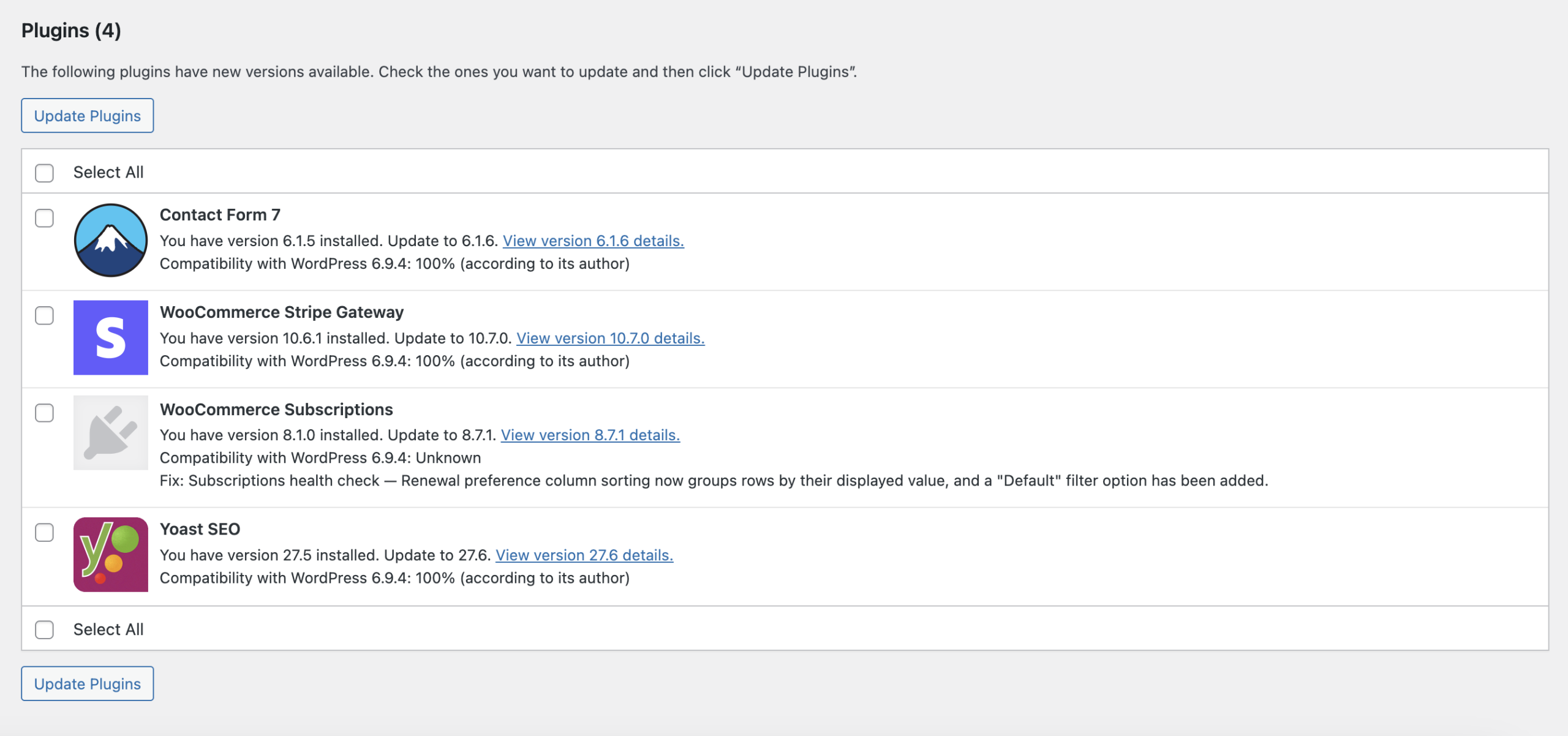
But the risks aren’t only security-related. Falling behind on updates can also lead to a broken site, slow performance, compatibility issues, or plugins that suddenly stop working altogether. As WordPress continues to evolve, older software may no longer communicate properly with newer versions of plugins, themes, browsers, or server environments.
That’s why updates need to be handled carefully rather than simply clicking “Update All.” A solid maintenance team will back up your site before running updates, monitor licenses for premium tools, and test thoroughly after updating to make sure that everything works properly.
They’ll also use staging environments to test updates before pushing them live. This extra step helps them catch plugin conflicts, visual issues, or functionality problems before they impact your live website. It’s a more proactive approach that reduces downtime, protects the user experience, and ensures that your site stays both secure and functional over time.
General management tasks
When people picture a maintenance plan, they typically imagine the ongoing day-to-day management that keeps a website accurate, functional, and useful. Depending on the provider and the needs of your business, that support can cover a wide range of tasks.
On the content side, maintenance may include publishing or updating blog posts, refreshing outdated information, adding new products or events, and making routine edits across your site. Even smaller tasks — like moderating and responding to comments — play an important role in maintaining an active, trustworthy online presence and keeping visitors engaged.

A strong maintenance plan also includes ongoing monitoring of your website’s overall performance. Checking on traffic patterns, bounce rates, conversions, and top-performing pages allow your team to identify what’s working well and where visitors encounter friction. Those insights can guide smarter content updates and site improvements over the long term.
Routine site audits are another important piece of the puzzle. Broken links, missing pages, outdated content, and crawl errors create a frustrating experience for visitors and negatively affect your visibility in search engines. A maintenance team can watch for and correct these issues early so your website continues to perform at a high level.
SEO optimization
Search engine optimization requires ongoing work. As trends and search algorithms change, your content strategy must evolve too. SEO should be treated as an ongoing part of website maintenance rather than a separate one-time project.
Regular updates, technical reviews, content improvements, and performance monitoring all work together to help your site stay relevant, competitive, and easy for both visitors and search engines to navigate.
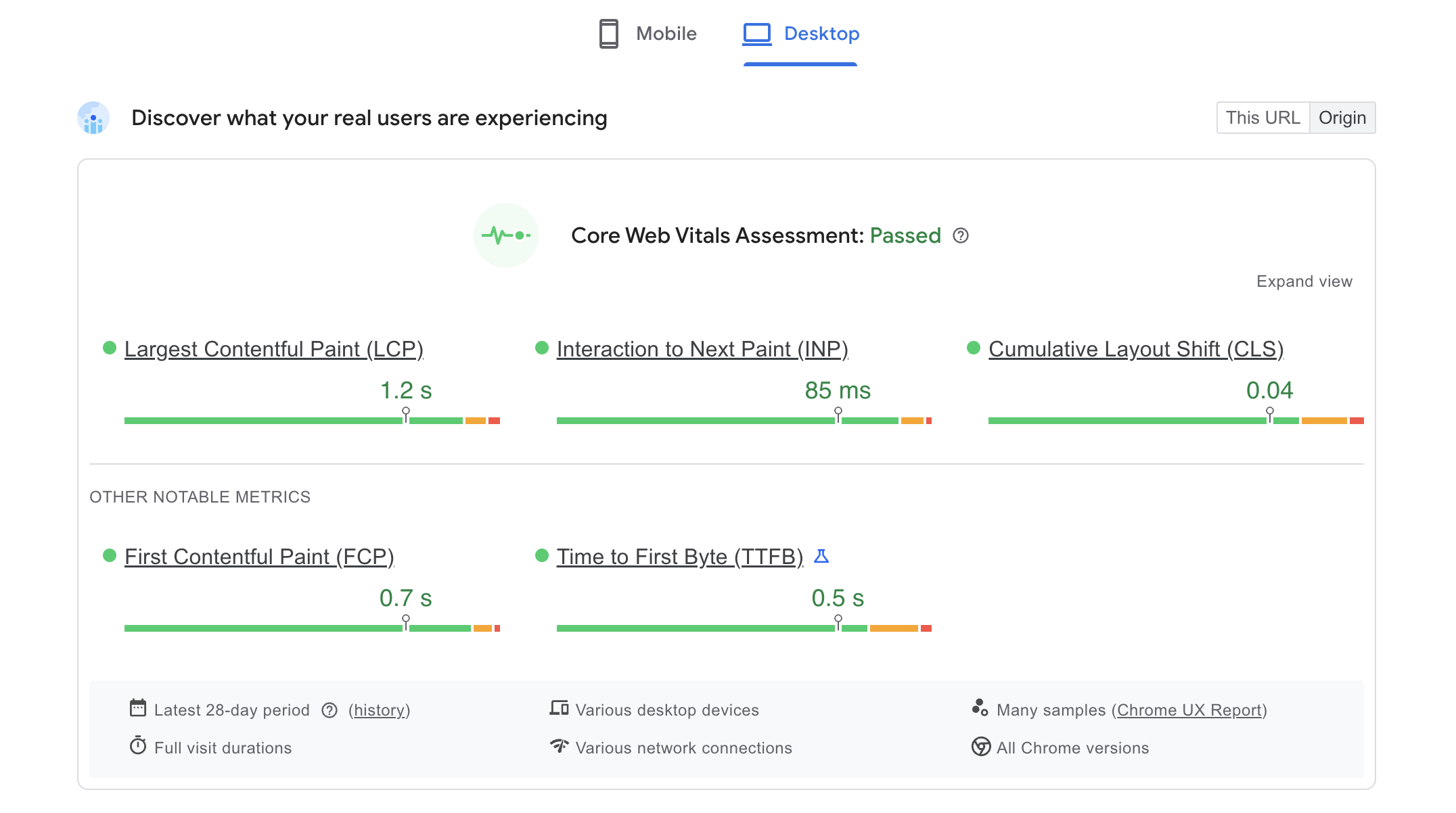
The following SEO tasks support your long-term search visibility and overall website performance:
- Rank monitoring: Keep tabs on how your site ranks for target keywords to learn where to focus your efforts in the future.
- Blog posts and product optimization: Review new and existing site pages from time to time so they’re optimized for the right keywords and don’t contain out-of-date information.
- Backlinks and internal links: Building quality backlinks from reputable sources signals authority to search engines, while strong internal links helps visitors and crawlers navigate your website.
- Error monitoring via Search Console: Monitoring your Google Search Console account can help you catch and resolve crawl errors, indexing issues, and other errors that could harm your rankings.
- Speed testing and optimization: Regularly audit page speed to keep your site loading quickly for site visitors. Performance also plays a role when it comes to search engine rankings.
A strong SEO strategy is visitor-focused and shows search engines that your website is active, trustworthy, and consistently providing relevant, high-quality information.
Add-ons
Not every website has the same needs, and a maintenance plan shouldn’t be one-size-fits-all. Here are some additional services that a support team can add based on the size, goals, and complexity of your site.
Content creation
Updating your site with fresh content takes far more time than many business owners expect. A well-written blog post, landing page, or product description requires research, writing, editing, formatting, SEO optimization, image creation, and review before it’s ready to publish. For businesses already balancing day-to-day operations, consistently creating that content can quickly become overwhelming.

That’s why content creation is often offered as an add-on service within a website maintenance plan. Instead of trying to fit content into an already full schedule, you have ongoing support for writing, updating, and publishing on a consistent basis. This can include everything from blog posts and landing pages to product updates, service pages, and SEO-focused content improvements.
Hosting plan maintenance
Your hosting environment is the foundation for your WordPress site, and it plays a major role in speed, uptime, security, and reliability.
Hosting-related maintenance ensures that your server environment continues to support your website as your business grows. This can include monitoring performance, storage usage, bandwidth limits, uptime, and resource allocation to make sure your plan is still the right fit. In some cases, that means identifying when your site has outgrown its current environment.
This type of support can also take a major technical burden off your plate when problems arise. Instead of trying to troubleshoot server issues or navigate hosting support on your own, your maintenance provider can communicate directly with the hosting company, investigate concerns, and coordinate fixes more efficiently.
Domain name management
Your domain name is a core part of your brand and the central hub of your website, email accounts, marketing materials, and online presence. If a domain registration accidentally expires, the consequences can be serious, ranging from website downtime and email outages to the potential loss of the domain entirely.
Recovering from a lapsed domain can be complicated and, in some cases, costly. Domain changes affect critical systems behind the scenes, including DNS records, email routing, SSL certificates, and website connections. If those changes are handled incorrectly, they can cause widespread disruptions across your business.
Domain management services prevent those issues by keeping registrations up to date, maintaining accurate DNS settings, and assisting with domain purchases and transfers.
Email services and management
Things like deliverability issues, storage limits, spam filtering, device syncing, DNS records, and security settings can all affect how reliably your business email works on a day-to-day basis.
Email management keeps your professional email accounts running smoothly behind the scenes. This can include creating new inboxes, fixing delivery problems, managing storage, setting up devices, and maintaining the technical settings that ensure your emails are delivered instead of ending up in spam folders.
Your maintenance plan should work for you
Your website is a living thing and needs ongoing attention to truly work for your business. A quality maintenance plan protects your hard work, improves your visitor experience, and helps you grow without requiring a lot of work from you or your team.
If you’re looking for a maintenance plan tailored to your site and the way you work, we can help! Explore our maintenance plans and find the level of support that makes the most sense for your business.


